Case study
Datum CorporationOverviewDatum Corporation is a consulting firm that has a main office in Montreal and branch offices in Seattle and New York.
Azure EnvironmentDatum has an Azure subscription that contains three resource groups named RG1. RG2, and RG3. The subscription contains the storage accounts shown in the following table.

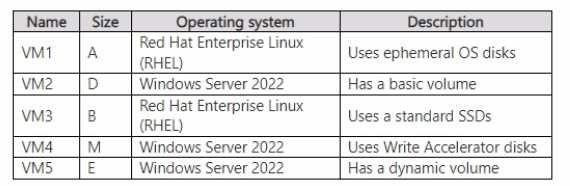
The subscription .contains the virtual machines shown in the following table.
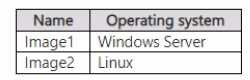
The subscription has an Azure container registry that contains the images shown in the following table.
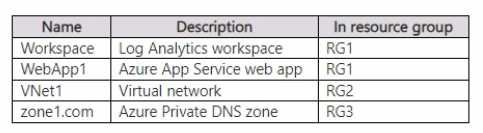
The subscription contains the resources shown in the following table.
The subscription contains an Azure key vault named Vaultl.
Vault! contains the certificates shown in the following table.
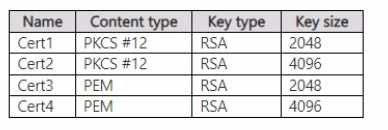

Vaultl contains the keys shown in the following table.
Microsoft Entra EnvironmentDatum has a Microsoft Entra tenant named adatum.com that is linked to the Azure subscription and contains the users shown in the following table.
The lenant contains the groups shown in the following table.
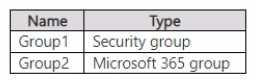
The adatum.com tenant has a custom security attribute named Attribute1.
Planned ChangesDatum plans to implement the following changes:
• Configure a data collection rule {DCR) named DCR1 to collect only system events that have an event ID of 4648 from VM2 and VM4.
• In storage1, create a new container named cont2 that has the following access policies:
o Three stored access policies named Stored 1, Stored2, and Stored3 o A legal hold for immutable blob storage
• Whenever possible, use directories to organize storage account content.
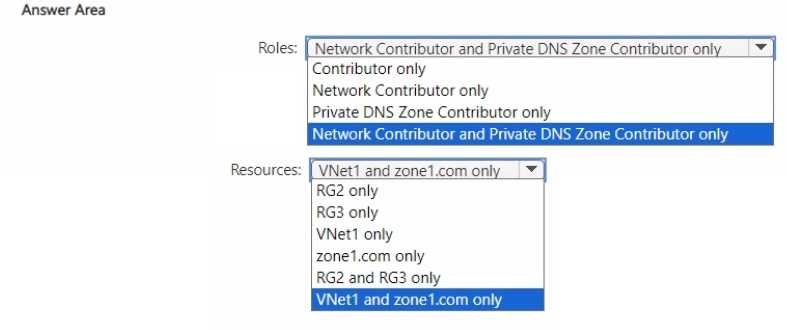
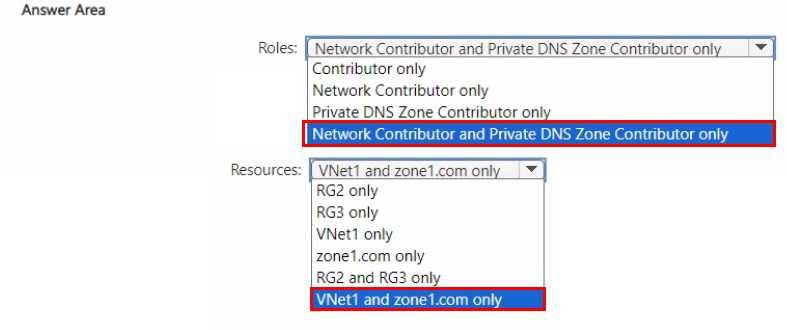
• Grant User1 the permissions required to link Zone1 to VNet1.
• Assign Attribute1 to supported adatum.com resources.
• In storage2, create an encryption scope named Scope"1.
• Deploy new containers by using Image1 or Image2.
Technical RequirementsDatum must meet the following technical requirements:
• UseTLSforWebApp1.
• Follow the principle of least privilege.
• Grant permissions at the required scope only.
• Ensure that Scope1 is used to encrypt storage services.
• Use Azure Backup to back up cont1 and share1 as frequently as possible.
• Whenever possible, use Azure Disk Encryption and a key encryption key (KEK) to encrypt the virtual machines.
You implement the planned changes for Scope1.
You need to ensure that Scope1 meets the technical requirements.
What can you encrypt by using Scope1?
Show answer
Answer: E
Explanation
In Microsoft Azure, encryption scopes are a StorageV2 (general-purpose v2) storage account feature that allows fine-grained control over encryption settings for data stored within a single account. According to Microsoft Azure Storage documentation, an encryption scope defines a specific encryption context that can be applied at the container or blob level and is supported in non-hierarchical namespace storage accounts (those without Data Lake Gen2 enabled).
In the given scenario:
storage1 has Hierarchical namespace = Yes (Data Lake Storage Gen2 enabled).
storage2 has Hierarchical namespace = No.
The plan was to create an encryption scope named Scope1 in storage2.
The technical requirement specifies that Scope1 must be used to encrypt storage services.
According to the Azure Administrator documentation on encryption scopes:
“Encryption scopes are supported for block blobs, append blobs, page blobs, Azure Files, queues, and tables in standard StorageV2 accounts. Encryption scopes are not supported in hierarchical namespace (Data Lake Gen2) enabled accounts.”
This means that Scope1—created in storage2, which does not have hierarchical namespace—can encrypt all blob data (containers and blobs) as well as file shares, queues, and tables.
However, storage1 cannot use encryption scopes because hierarchical namespace storage accounts (ADLS Gen2) manage encryption at the account level and do not support per-scope encryption.
Therefore, only storage2 can apply Scope1, and it can encrypt containers, blobs, file shares, queues, and tables.